← Back to Projects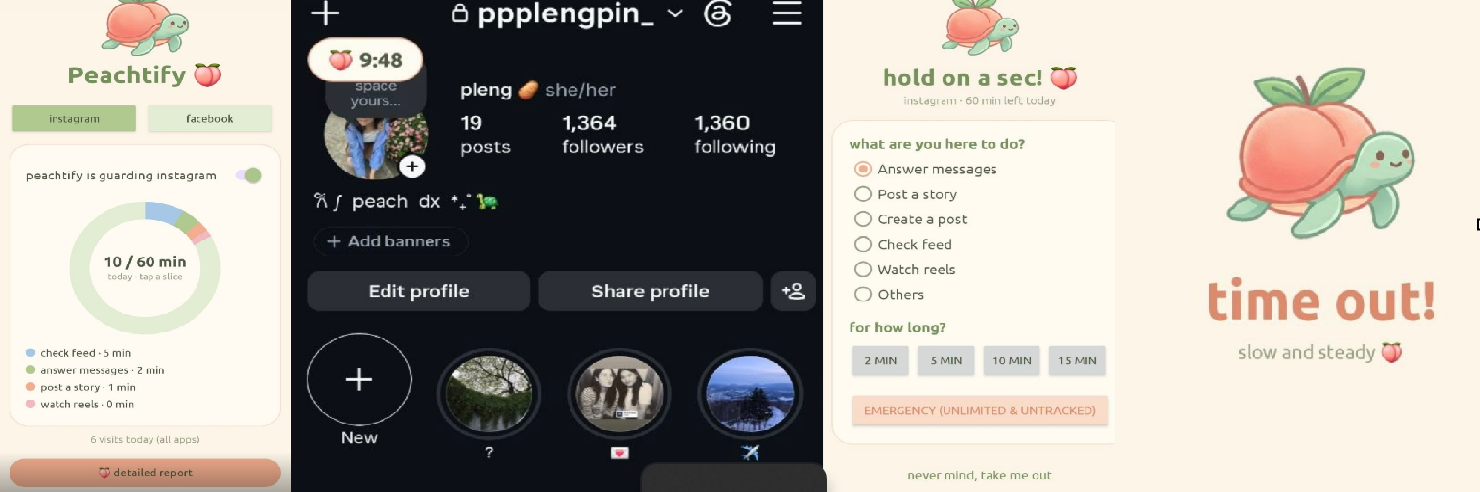
August 12, 2026. Posted by Peach
Peachtify - my social media control tool so I don't have to pay for one :D
I open Instagram to reply to one message. Forty minutes later I'm deep in reels about someone reorganising their fridge, with no memory of deciding to watch any of it. Then I do it again after dinner.
I wanted something that would stop me at the door and make me say out loud what I came for. But every app I found either wants a subscription, or wants permission to watch my screen all day. I didn't want to pay monthly to use Instagram less, and I definitely didn't want to hand some company I've never heard of a live feed of everything I do on my phone.
So I made my own. It's called Peachtify 🍑
When I open Instagram or Facebook, a turtle blocks the screen and asks two things: what are you here to do, and for how long? I pick something like "check feed, 5 minutes" and a small peach timer floats in the corner while I scroll. In the last minute it turns red. When it hits zero I get kicked back to the home screen.
Each app gets one hour a day. After that, opening it just gives me a full screen that says "NAH. ENOUGH INTERNET FOR TODAY." There's an emergency button for when I actually need to reach someone.
It only wakes up when I open those two apps. Nothing runs in the background, nothing leaves my phone, and everything older than a month deletes itself. That was the whole point.
The honest part: I had never built a mobile app before. My experience is web and coursework, so Android was completely new to me. I didn't know what an accessibility service was, or that apps can draw over other apps, or why my timer kept losing minutes (Android was quietly killing my service, so now it saves progress every 15 seconds). Most of what I learned came from using the app myself and then going back to fix whatever annoyed me. The first version had text I literally couldn't read because I use dark mode.
Tech stack : Kotlin, Android SDK, AccessibilityService, WindowManager overlays, custom Canvas views, Material Components, SharedPreferences, Gradle.
It's still rough and it has exactly one user. But it's been genuinely useful, and building something unfamiliar was a good reminder that "I don't know how to do this yet" is a much smaller problem than it feels like.